Blog
Five Questions Every Street Sweeping Program Needs to Answer
by Routeware Team • April 20, 2026

Street sweeping keeps communities looking their best — it may not stop the clock the way a missed waste collection or an unplowed winter road does, but it matters to the people who notice. When done properly, predictably and with precision, street sweeping is a source of civic pride. As such, it is certainly a fleet deserving of the latest digital tools.
But for most cities around the country, digitized street sweeping operations is not yet a reality. In our recent webinar, “How Cities Run Smarter Street Sweeping with SmartCity“, the live poll results were telling.
69% of the public works professionals in attendance did not indicate they real-time visibility into which streets had been completed during a shift. And when asked about their current tracking method, the most common answer was: spreadsheets, or nothing digital at all.
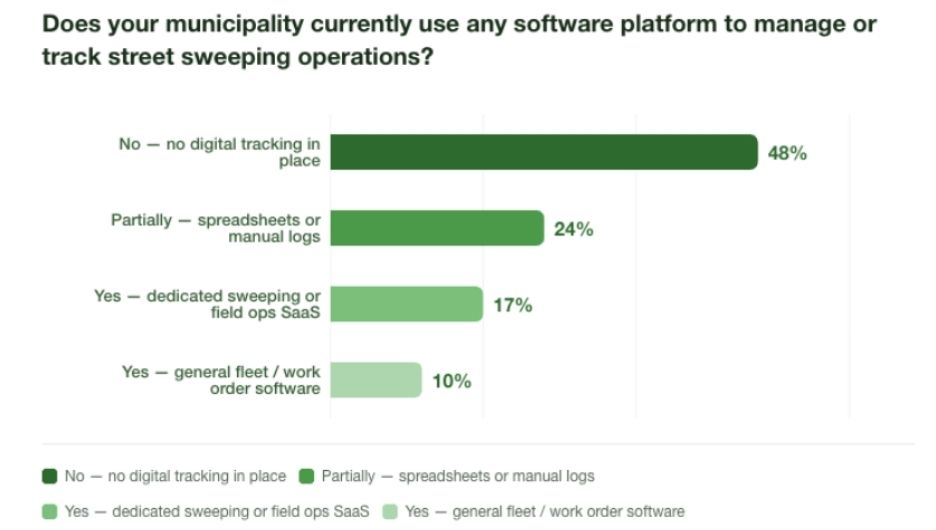
This isn’t a criticism. It’s just the current state of tech adoption for most street sweeping teams. Street sweeping has historically been managed by institutional knowledge, paper route sheets, and the reasonable assumption that if the truck went out, the work got done.
But “the truck went out” is not the same as “the street got swept.” And more cities are discovering — usually when a resident calls — that the difference matters more every week that goes by without tools to support service transparency.
Here are the five questions a modern street sweeping program needs to be able to answer. If your current setup can’t answer them quickly, it might be time to look at what’s possible.
1. What’s actually been swept today, and what hasn’t?
This sounds like a simple question. It isn’t.
Most supervisors find out about incomplete routes after the fact, like when a driver calls in, when a resident complains, or when someone goes to check a spreadsheet that’s already a day old. By then, the window to reassign or recover is gone.
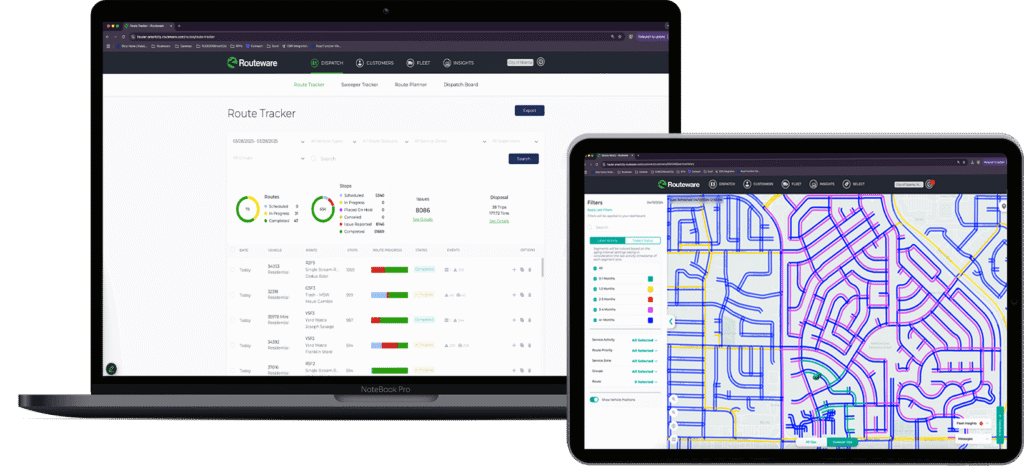
Real-time GPS tracking changes this. SmartCity shows supervisors a live, color-coded map of every active route: blue segments are yet to be done, green are complete. As a driver moves through the city, the map updates in real time. You don’t need to wait for a check-in call. You can see at a glance which trucks are moving, where they are, and how far along each route is.
For teams with multiple sweepers in the field, this becomes especially valuable. You can see your entire fleet at once, compare progress across routes, and spot issues while there’s still time to do something about them.
2. When was this specific block last swept?
This is the question that tends to surface when a resident calls. And it’s the one most programs can’t answer cleanly.
Telling someone “we sweep your area on alternating Tuesdays” is not the same as telling them when their particular block was last serviced and by whom. SmartCity tracks this at the segment level, not just the route level. Any supervisor can pull up a specific street, see the last service date, which driver completed it, and how many passes were made — right down to the time of day.
What makes this practical is the configurable color coding. If your program sweeps certain areas every two weeks, set the time range to two weeks, and streets start showing as overdue when they hit that threshold. If you run a more open, condition-based program, the map can show you which areas are getting stale so drivers can “go address the red ones” first.
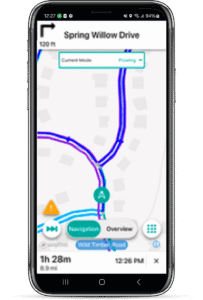
One of our product managers described it well during the webinar: some drivers want the navigation and the full guided path. Others just want to operate like Pac-Man and gobble up everything that’s blue. The system supports both styles.
3. Why wasn’t this route finished?
Incomplete routes happen. Equipment goes down. A parked car blocks a segment. Construction closes a street. A driver runs out of time.
The problem isn’t that these things happen, it’s that most programs have no structured way to capture why, which means the same gaps appear week after week with no one connecting the dots.
SmartCity gives drivers a way to log exceptions in the field: what happened, where, and optionally, a photo. These aren’t vague end-of-day notes. They’re timestamped, GPS-located records tied to the exact segment where the issue occurred. If a car is consistently parked on a specific block every Tuesday — a sweeping day — that pattern becomes visible. The city can take action: a residents notice, a bylaw referral, or simply a standing city alert that warns drivers what to expect before they arrive.
City alerts can be pre-loaded in bulk too. If your city has catalogued metal plate locations across the network, those can be uploaded into the system so drivers receive voice and on-screen notifications as they approach. It’s the kind of institutional knowledge that usually lives in one experienced driver’s head — now shared across the whole fleet automatically.
4. What happens when something unexpected comes up?
Street sweeping programs get disrupted. A spill needs cleaning. An event runs long and leaves debris across three blocks. A complaint comes in about a section that was missed.
SmartCity handles this through what it calls ad hoc jobs: one-time street sweeping assignments that can be created on the fly and added directly to an existing driver’s route. If a regular scheduled route is running in the same part of the city, the ad hoc job can be tacked on at the end to minimize dead miles.
These one-off jobs carry all the same capabilities as planned routes: GPS verification, service confirmation, driver notes, and photos. Which means if the job is contracted work — a post-event cleanup, a special services request — there’s a timestamped, documented record to back up the invoice.
It was hard to know where drivers were. Now that we have Routeware, we’ve been able to see where drivers are and what time they passed certain roads
The Result: 85K estimated annual operating cost savings.
Islington Council have done a fantastic job. Their new service reduces vehicle emissions that we all know will lead to improved air quality. The icing on the cake of this redesign is the increased cleanliness of each area – a real win-win for everyone.
The Result: 21% reduction in complaints about missed street cleansing.
5. Can I prove the work was done?
This used to be a nice-to-have. Increasingly, it’s essential.
Resident complaints, council inquiries, contracted service verification, liability questions; all of these can hinge on whether a municipality can document that a specific street was serviced on a specific day. A paper route sheet doesn’t hold up well under that kind of scrutiny. GPS breadcrumb trails, timestamped photos, and segment-level service records do.
SmartCity generates two types of reporting for street sweeping operations: a dashboard-based insights view for teams who want visual charts and trend data, and exportable table reports for those who prefer a more traditional spreadsheet format. Both can be filtered by date range, route, and driver.
Importantly, the table reports can be emailed to anyone, including departments or contacts who don’t have portal access. If Public Works needs to share documentation with another department, or a supervisor needs to brief leadership, the data doesn’t require a login to reach the people who need it.
What a modern program looks like
Here’s a quick reference for what each of these five questions looks like in practice: managed the old way versus managed through SmartCity.
| Question | Without dedicated software | With SmartCity |
|---|---|---|
| What was swept today? | End-of-day driver report or phone call | Live color-coded map updating in real time |
| When was this block last done? | Manual log lookup — if it exists | Segment-level service history, searchable by street |
| Why wasn’t the route finished? | Verbal explanation after the fact | In-field exception log with GPS location and photo |
| How do I handle an unplanned job? | Manual rerouting, no documentation trail | Ad hoc job added to existing route, fully tracked |
| Can I prove the work was done? | Paper route sheet | GPS breadcrumb trail, timestamped, exportable report |
The bigger picture
What our recent webinar poll captured isn’t just a technology gap. It’s an operational visibility gap and it’s one that affects everything from how supervisors deploy resources to how cities respond when residents ask questions.
Street sweeping is visible work. Residents notice when it happens and when it doesn’t. Programs that can answer basic questions about their own operations — quickly, confidently, and accurately — are in a fundamentally different position than those that can’t.
SmartCity doesn’t just track whether a truck went out. It tracks whether the street got swept.
Want to see these capabilities in action? Watch the full SmartCity street sweeping webinar here.